Building useful websites
Link preview image missing or wrong? Check the HTML and image response
Follow the path from the shared URL to the actual image bytes. Six controlled examples show why a working webpage—or a 200 response—does not guarantee a usable preview.
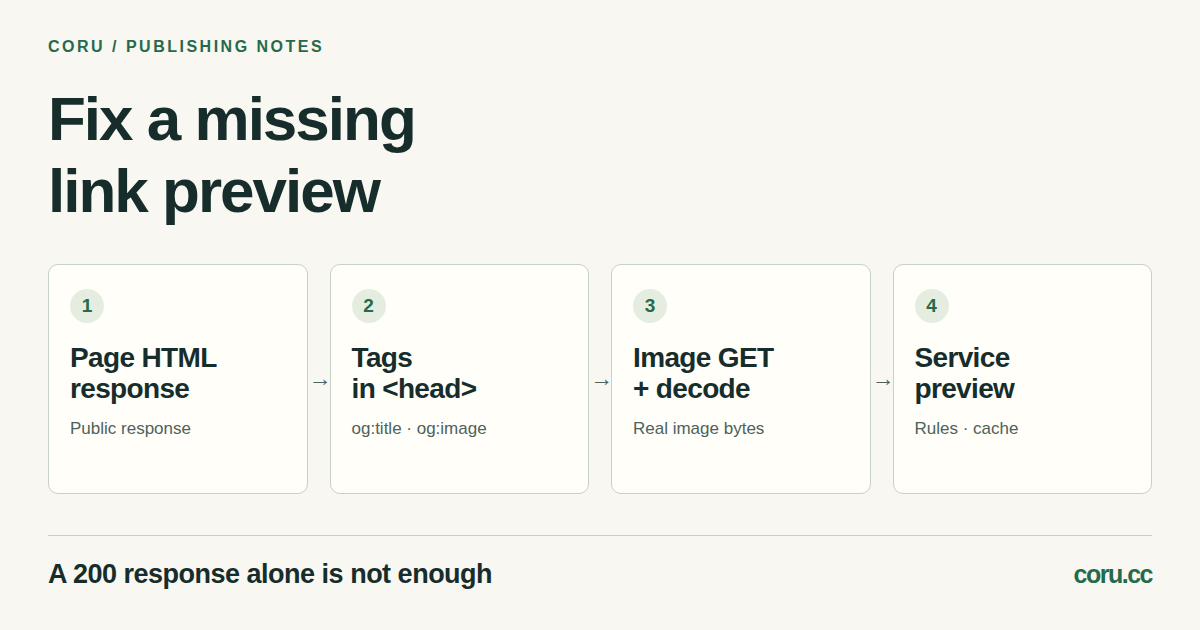
1. Separate the page, its image and the sharing service
A picture can work inside your webpage and still be missing when someone shares the link. The sharing service fetches its own information about the page; it does not simply copy the tab you are looking at. For example, Slack documents fetching a URL and reading common Open Graph or X Card metadata for its classic previews.
Start with the exact public URL that was shared, the service, the time and the wrong result: no card, wrong title, old image or no image. Check the final destination if the URL redirects. Use a signed-out session as one comparison, but remember that your browser and the service make different requests.
The useful diagnostic order is: page response → metadata in that response → image response and decoded image → the service’s preview. A successful check at one step does not prove that the next step works.
2. Read the returned HTML before inspecting the live DOM
In a new empty working directory on Linux or macOS, replace the example address below with your public article URL. The command saves the final response body as page.html and the response headers, including redirect hops, as page-headers.txt. It overwrites these two files if they already exist.
curl -q -sS --compressed --max-time 20 -L --max-redirs 5 -D page-headers.txt -o page.html 'https://example.com/article/'
Open page-headers.txt as text and inspect the final HTTP status and Content-Type; then open page.html as text and look inside its head element. This is the server response, before JavaScript changes the document. DevTools Elements shows the current DOM, which may contain tags added later. In our local test a script-added og:image was visible in Elements but absent from the downloaded response. That difference alone does not establish how every sharing service runs JavaScript.
The command makes a GET, follows at most five HTTP redirects and has a 20-second overall time limit. -q skips the default curl configuration; --compressed requests supported compression and decodes it. Saved headers remain unchanged even when curl decompresses the body. -sS hides the progress meter but shows errors. A completed transfer can still be HTTP 404: inspect the headers. A timeout or redirect-limit error needs resolving before interpreting a partial output file.
This request does not copy your browser’s cookies or impersonate the sharing service. Keep headers private if they contain session information. If curl is unavailable, use the browser Network panel to inspect the document response; do not rely solely on Elements.
3. Give the page one deliberate Open Graph description
The Open Graph protocol defines four required basic properties: og:title, og:type, og:image and og:url. Put the page-specific tags in the head of the returned HTML. The example below is a pattern, not a working image address. Replace the title and both URLs with your own public values; use an absolute HTTPS image URL to remove ambiguity.
<meta property="og:title" content="A guide to fixing a missing link preview">
<meta property="og:type" content="article">
<meta property="og:url" content="https://example.com/article/">
<meta property="og:image" content="https://example.com/assets/preview.png">
<meta property="og:image:alt" content="Four checks: page HTML, metadata, image response and service preview">
og:url identifies the canonical URL for the object. og:image:alt describes the image; it is not the article caption. Optional og:description can supply a short page summary. An ordinary img element, a CSS background or a favicon does not itself supply the og:image tag.
Search the full returned head for repeated tags. Multiple og:image values can be intentional alternatives, but the protocol gives the first conflicting value preference. A plugin that leaves an old image first can therefore matter even when the new value appears later. Inspect the final combined output of the template and plugins, and place each image’s width, height and alt properties immediately after that image. Do not assume the last tag overrides the first.
4. Fetch the image itself and check what came back
Copy the actual og:image URL from the response. Replace the example below, then run this second GET in the same working directory. It overwrites image-headers.txt and preview-image.
curl -q -sS --compressed --max-time 20 -L --max-redirs 5 -D image-headers.txt -o preview-image 'https://example.com/assets/preview.png'
Check the final status, Content-Type and any Location redirects. A 200 login page is still HTML, not an image. An image/png header is also insufficient if the body is an HTML error page or damaged bytes. Open the saved file with an image viewer and confirm the expected picture and actual pixel dimensions. The extension alone is not evidence of its contents.
For a public preview, the service needs to be able to retrieve the page and selected image without your personal browser session. If your checks work but the service still fails, inspect its documented crawler behavior, robots rules and your host’s access or firewall logs. A curl success does not prove that a different user agent, network or request time will get the same response. Keep authentication on genuinely private content; choose a deliberately public share image only when that is appropriate.
Check the particular service’s current image-format, dimensions and file-size requirements. There is no single image recipe here that guarantees the same card in every app. Our own guide uses a 1200 × 630 PNG as an editorial choice, not a universal requirement.
5. Compare six cases in a controlled example
Coru tested these cases on a local HTTP server with curl and Chromium on 21 October 2026. We compared raw HTML, the live DOM, image responses and browser decoding. This was a diagnostic experiment, not a run through a real social platform’s crawler or cache.
- Working case: initial HTML contains og:image; its URL returns a PNG that the browser decodes.
- Script-added tag: the initial response has no og:image, but the live DOM has it after JavaScript runs. Fix the response if the target service needs metadata there.
- Missing file: the image request returns 404. Correct the address or publish the asset.
- Login redirect: the image request ends at a 200 HTML login page, which fails image decoding. Check the access path, not just the final status.
- Old image first: the response contains two different og:image values, with the old one first. Review the order and any plugin that emits the old tag; the local parser does not prove a platform’s final choice.
- Mislabeled body: the server returns 200 and image/png but sends HTML bytes, which fail image decoding. Repair the response body and header together.
6. Recheck the intended service after the page is fixed
Use the service’s own inspection tool where one exists. LinkedIn’s Post Inspector lets you inspect a URL and refresh the preview used for new posts; its help explicitly says this does not update existing posts. Treat the tool’s result as evidence about LinkedIn at that time, not a guarantee for every app.
If the page and image are correct but an old card remains, distinguish an existing post from a newly created share and consult that service’s cache behavior. Slack, for example, documents its own caching for fetched link metadata. Repeatedly clearing your browser cache does not establish that a remote service fetched new bytes.
Keep a short repair record: shared URL; final page URL/status; returned og:image value and order; final image URL/status/type and decoded dimensions; service and inspection time; result on a new share. Compare with the original failure. If it still fails, that record gives your host or plugin maintainer a concrete failing step. Remove cookies and private tokens before sharing the record.